


Realized this was probably a motive rejection, but I wanted to post it here, because I think it's funny:


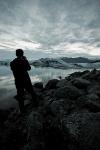
Realized this was probably a motive rejection, but I wanted to post it here, because I think it's funny:
AeroPX Aviation Photography - Website | Facebook
AVP Talk (Aviation Photography Talk) - http://avptalk.com
1/400 Diecast Aircraft Models - http://diecastwings.com
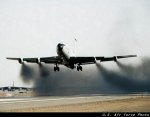
For my next trick, I will land on the roof of this small van...
KC-135 - Passing gas & taking names!
http://www.jetphotos.net/showphotos.php?userid=15086
http://moose135.smugmug.com
Because this thread should never die- both for 'soft'

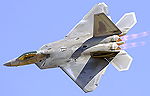


William, nothing a bit of USM can't fix
There are of course a bit oversharpened as I was working from your JPGs but given the right workflow, here is an idea of what A.net sharp is: Remember to right-click and view image at full size since the forum likes to resize to 800px wide.

Manny Gonzalez
Thrust Images | General Photography | R.I.P. Matt Molnar 1979-2013
BRING BACK THE KJFK/KLGA OBSERVATION DECKS
Thanks Manny that definitely looks sharper. I just have to make some time to sit down and actually learn the USM thing. I'm in the 'choose between sharpening the aircraft enough but now the sky is noisy or don't sharpen everything as much but now the plane's soft' catch-22 right now.
Don't sharpen the sky! When I'm sharpening an image, I select the sky, then invert the selection so that only the aircraft is selected before applying USM.
KC-135 - Passing gas & taking names!
http://www.jetphotos.net/showphotos.php?userid=15086
http://moose135.smugmug.com
William, Moose is right... I go a bit further just to make it less abrupt...
--Duplicate your base layer or whatever your current final edit layer is.
--Select Sky, best as you can. Using the Magic Wand, change the [tolerance] to help you select more or less of it in one swoop without intruding on aircraft. Think of tolerance slider as the difference in brightness between where you click and any adjacent pixels. The tool looks at the pixels you clicked on (the area used to be an 8x8 grid but that was Photoshop 1.0) and then using the tolerance number you dialed, looks around and keeps selecting as long as the adjacent pixels are within the tolerance number in brightness up or down!
--Invert the selection (in Windows, the shortcut is CTRL+SHIFT+I)
--Grow the selection by 10-15 pixels: Select > Modify > Expand...
--I now like to soften the edges of the selection so that the effect is not so abrupt on the edge of contact between fuselage and sky. Select > Modify > Feather... I use 5 pixels.
--Now sharpen away to taste. After each USM pass or whatever sharpen method you use, go over the layer being sharpened and either mask or erase away areas that have been oversharpened. Flatten your image after each pass and then duplicate again and check for areas that may need more sharpening. The goal for A.net sharp is to have very very small jaggiess start to appear and then back away one level of USM.
If you start with a critically sharp original and reduce to 1024-1200 pixels wide, a single USM pass of say 50,0.3,0 should be sufficient. If your version of Photoshop is new enough, Smart Sharpen is a far better sharpening tool as it is dynamic as opposedto the blunt process of USM
Manny Gonzalez
Thrust Images | General Photography | R.I.P. Matt Molnar 1979-2013
BRING BACK THE KJFK/KLGA OBSERVATION DECKS
Thanks for the advice guys, I have heard the 'don't sharpen the sky' bit many times so that is no surprise. I'm actually using Paint Shop Pro Photo X2, I need to translate what you said into how to do it with that software(it was a free gift from the girlfriend)- I'm sure it can do layers and I know it has its own version of USM, just need to figure it out when I have some actual time. Hard to do that between work, my lady, my other photography, training for some upcoming road races, transitioning to the Captain Sim 757-200 and -300, and my 6 guitars.
I was on a strike of sorts with submitting to them for over a year as I refused to become a slave to their ridiculous acceptance criteria, but I decided to make an exception for the 787 and give it a whirl.
William, I hear you. You certainly don't have to upload to them if you don't want to... Do you have your own website? That's what I did and many of us have done to be able to show WHATEVER we like in whatever condition
Let me know if I can be of further help... sorry about Corel X2 ... that is not a friendly piece of software unfortunately... powerful indeed, but kind of obscure. Here are some tuts I found on line...
http://graphicssoft.about.com/od/pai..._Resources.htm
http://www.vtc.com/products/Corel-Pa...-tutorials.htm
Manny Gonzalez
Thrust Images | General Photography | R.I.P. Matt Molnar 1979-2013
BRING BACK THE KJFK/KLGA OBSERVATION DECKS

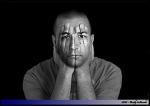
You could also use the High Pass Filter to do sharpening. Duplicate the layer, go to filters/other/high pass. Select a radius of no more than 0.3 and hit enter. The screen will turn grey where you will see an outline of the photo. On the layers pallet, make the blending mode to "linear light." Note, this will sharpen the entire image. Simply take the eraser tool and pass over jagged edges, the sky, and any other areas with noise. The beauty of Photoshop is that there are many ways to do the same task.
Here are some of my recent rejects...
Take your pick here: Bad composition, bad framing, and motive. I wanted to point out how Phoenix is creating an air train to pass OVER the taxiway where planes filled with people will pass under. The logic is just mind boggling to me because FOD will fall off of that track onto the taxiway. I don't even want to think about some sort of structure failure over the taxiway. Anyways, apparently JP didn't appreciate what I was trying to display.
A bit of heat distortion in this one. This a is a major problem with Phoenix, but it's so much fun to spot at!
This one hurt SIMILAR PHOTO UPLOADED!. Anyways, the similar photo is just of this one coming around the corner. I forgot I had gotten it accepted a few weeks ago

Timothy, I think the motive on the first one is justified as it has lots of dead space ... You could have certainly gotten the message across by cropping tighter and still show the overpass. Perhaps a more balanced image with the plane directly below the structure.As for the overpass, LAX is going to have a sky bridge across the ramp between the two International Arrival Terminals, high enough for an A380 to pass under. I think the engineers have thought through all the issues ... in your image, it looks like a concrete design where the actual bridge is a tub and tracks, electrical, etc. is completely embedded without gaps... having a bridge collapse is highly unlikely in this day and age. I can;t wait to see images shot from the train with traffic passing below :-)
Manny Gonzalez
Thrust Images | General Photography | R.I.P. Matt Molnar 1979-2013
BRING BACK THE KJFK/KLGA OBSERVATION DECKS
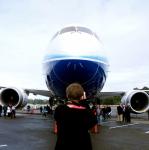
Dark, soft, motive, and they didn't like that I wrote in comments: for NYCAviation
http://www.airliners.net/procphotos/...eingvisit2.jpg
Dark? A little :-) Soft? hmmm, maybe the tail a little bit? that's a stretch... Motive, indeed, looks like the president did not help
Manny Gonzalez
Thrust Images | General Photography | R.I.P. Matt Molnar 1979-2013
BRING BACK THE KJFK/KLGA OBSERVATION DECKS
 Posting Permissions

 Reply With Quote


Bookmarks